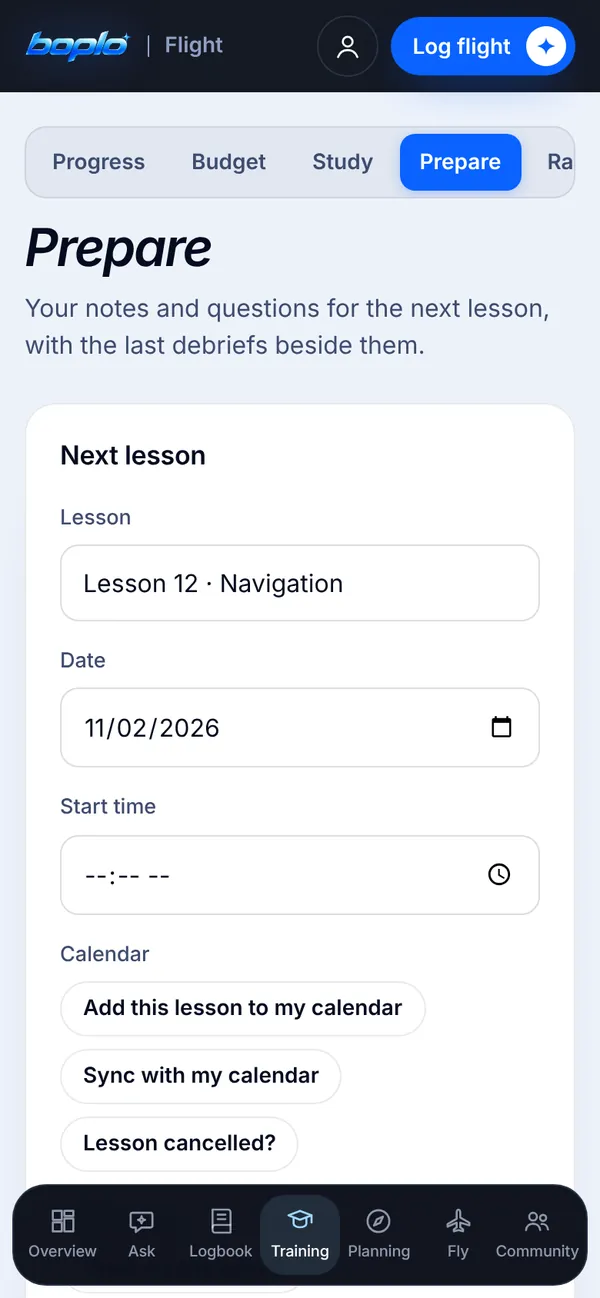
Before the lesson
Lesson 12 is navigation. Your preparation notes and the questions for your instructor are already attached to it.
 Flight
New For student pilots working toward PPL(A) or LAPL
Prepare for the next lesson, log what you flew and watch the hours build toward your licence. One flight desk that stays on the ground with you.
Download on theApp StoreFor student pilots training under the FAA, UK CAA or EASA.
Scroll to fly an example lesson
Lesson 12 is navigation. Your preparation notes and the questions for your instructor are already attached to it.
Boplo isn’t in the cockpit. You fly the lesson with your instructor and check weather and NOTAMs through official sources.
Log the flight while it’s fresh: time, role, landings and the debrief. The track sits on the map beside it.
Every flight adds to one record, so you can see the hours build toward the goal you set.
Flight training is spread across a paper logbook, a notes app and whatever you remember from the debrief. Boplo keeps the next lesson, the last one and every hour in between in one place.
The flight desk is built around the licence you chose and the lesson you have booked. Here it is with an example account.
When would you divert if the reservoir turn is late?
Which frequency do I change to first after departure?
Keep preparation notes and questions with the lesson they belong to, so the briefing starts where you left off.
Add the points you flew and the route sits on satellite imagery next to the flight it came from.
“Turn at the reservoir was 40 seconds late. Start the timing from overhead, not abeam.”
Time, role, aircraft, landings and the debrief notes, recorded against the lesson.
See flight time by month and by role, alongside the hours you already had when you joined.
Choose the licence, the authority and a date that belongs to you. The goal is yours to set.
Example account. Your instructor and your licensing authority decide what counts toward a licence.
Record the flight with GPS and the logbook keeps the track, every waypoint and the time between them. Then fly the same route again in the simulator.
KSEE Gillespie Field
Runways, radio frequencies and live weather for airfields worldwide. Plan a route to any of them, then fly it in the simulator.
airfields, across 240 countries and territories
runways, each with its heading and length
radio frequencies: tower, ground, ATIS and CTAF
aircraft to fly in the simulator, from a Piper Cub to a jumbo
Airfield data from OurAirports (public domain), refreshed October 2026. Check official charts before you fly.
Boplo is training support. These are the rules it runs on.
Boplo never tells you that you are ready for a flight, a solo or a test. That judgement belongs to your instructor.
Weather, NOTAMs and operating decisions come from the proper sources. Boplo doesn’t replace or summarise them.
Your notes, flights and hours sit in your account. Edit or delete any flight whenever you like.
Boplo is a personal record that explains how you got here. It sits alongside your logbook, not in place of it.
Most students piece their training together from separate apps. Here is what the same jobs cost bought one by one, at yearly App Store prices.
You keep $359.98 a year.
Yearly US App Store prices, checked November 2026. Those apps do more in their own fields: Infinite Flight is a full global simulator and ChatGPT covers every subject. This compares the training jobs Boplo Flight does. App names are trademarks of their owners; Boplo Flight isn't affiliated with them.
Add a card to start your trial and get the whole desk: logbook, lesson prep, nav logs, currency, study, radio practice and the simulator. Cancel before day 3 and you pay nothing.
$0for 3 days
Everything in Advanced. Add a card to start; nothing is charged until day 3.
$8.33$12.99 a month, billed yearlyper month
$99.99 a year, which saves you $55.89 compared with monthly. One payment covers a full year of training.Billed monthly at $155.88 a year. Yearly saves you $43.89.
Work out what your licence would cost Prices in US dollars, plus tax where it applies. Cancel any time; 14-day money-back guarantee. For training support, not flight instruction or operational approval. Try the example desk first Running a flight school? One plan covers every student.
TIKTOK
Our latest posts: first-lesson advice, quiz questions and landings from the Boplo simulator. Hover over one to play it with sound.
No. Boplo doesn’t teach you to fly. It keeps your preparation, flights and hours organised around the training you’re already doing with your school and instructor.
You can set a goal of the FAA Private Pilot certificate, a UK or EASA PPL(A), NPPL, LAPL, a Canadian, Australian or New Zealand PPL, or a next rating, or choose “still exploring” if you haven’t started. You also pick your licensing authority and country of training.
No. Keep your official logbook as your school and authority require. Boplo is a personal record with the context behind each flight.
No. Always check weather, NOTAMs and operating information through official sources and with your instructor.
Yes. Add your existing flight time when you set up, and it’s kept separate from the flights you log in Boplo.
Set your licence, add Lesson 1 or Lesson 21, and keep everything after it in one place.
Download on theApp Store